Each frequency belongs to one channel and cannot be duplicated.
Interserver
Interserver channels let two servers talk to each other; DraftBot takes on the user's appearance and forwards the messages.
The principle
An interserver links two channels belonging to different servers: every message written in one is automatically copied into the other by DraftBot, under its author's identity. Your members can therefore talk with the members of another server without having to join it.
The link relies on a frequency: a unique code generated in the first channel, which you then enter in the second one to connect them.
Available commands
DraftBot gives you three commands to manage your interservers.
/interserver generate
The /interserver generate command creates a unique frequency for your channel.
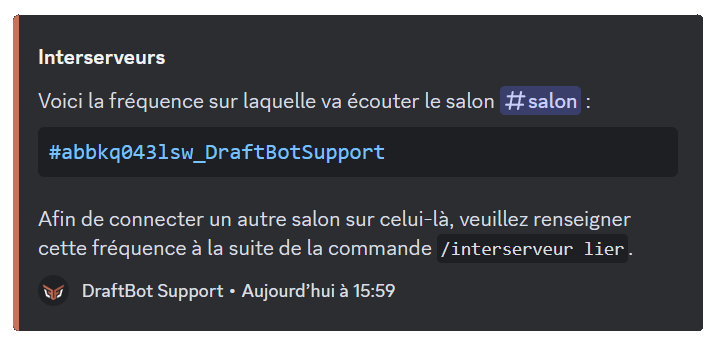
/interserver link
Once the frequency has been created, use /interserver link in the second channel you want to link to the first one.
The messages sent in one channel are automatically replicated in the other one through DraftBot.

/interserver manage
The /interserver manage command lets you check the frequency of a channel or change its existing link.
This command is useful for checking your configurations or finding an existing frequency.
Setting up an interserver
Here is the step-by-step process for linking two separate channels.
Creating a frequency
- Use /interserver generate in the first channel.
- A unique frequency is created and displayed by DraftBot.
Congratulations! The frequency is ready, you can now link a second channel!
Linking a second channel
- In the channel you want to connect, use /interserver link.
- Give the frequency of the first channel to establish the link.
Checking or managing the link
- Use /interserver manage to check the frequency or change the connection.
- Every piece of information about the link is displayed.
Congratulations! The interserver is now set up on your server!
Additional information
- You cannot link two channels of the same server.
- You can set up 1 interserver. Premium
 servers have no limit.
 - Messages from bots and webhooks are ignored.
- A channel cannot be linked to more than one frequency.
A cooldown applies to sending messages; it is there as a safety measure to prevent abuse.


