/admininventory add: when adding an item to a member, you can choose between adding an existing item or creating one.
Items & inventories
Obtain items through DraftBot's various systems and show them off to other members!
Obtaining an item
There are several ways to obtain an item:
| Reward | Description |
|---|---|
| Level rewards | Configurable through the /config command ➜ "Levels" or through the web panel |
| Buying in the shop | Configurable through the /config command ➜ "Economy" or through the web panel |
| Birthday gifts | Configurable through the /config command ➜ "Birthdays" or through the web panel |
| Giveaways | When using the /giveaway create command |
| Trades between members | With the /item command |
| The /dropitem and /item drop commands | They generate a message where you have to be the fastest to grab the item |
After choosing the item, two additional optional settings are available:
time➜ To set a drop duration between 1 and 10 minutes.channel➜ To set the channel where you want to send the drop.
Managing a member's inventory
With the /admininventory command, you can, as an administrator, manage the inventory of a member of your Discord server.
Several options are available:
| Command | Description |
|---|---|
| /admininventory add member | Adds an item to a member's inventory |
| /admininventory add server | Adds an item to every member of the server (asynchronous operation) |
| /admininventory add role | Adds an item to every member holding a specific role (asynchronous operation) |
| /admininventory delete | Deletes an item from the server for good |
| /admininventory rename | Renames an item in every inventory on the server |
| /admininventory merge | Merges two inventory items into one |
| /admininventory transfer | Transfers an item, a quantity of an item or a member's whole inventory to another member |
| /admininventory remove member | Removes an item from a member's inventory |
| /admininventory remove server | Removes an item from every member of the server (asynchronous operation) |
| /admininventory remove role | Removes an item from every member holding a specific role (asynchronous operation) |
| /admininventory reset member | Empties a member's inventory entirely |
| /admininventory reset server | Resets the inventory of every member of the server |
Bulk operations: commands targeting "every member" or "a role" run asynchronously. A progress message is displayed and updates automatically. You can cancel the operation at any time with the button provided.
Displaying your inventory
Server members can access their own inventory at any time using the /inventory command. If the member owns items, they are displayed, and they can also see the money they hold thanks to DraftBot's economy system.
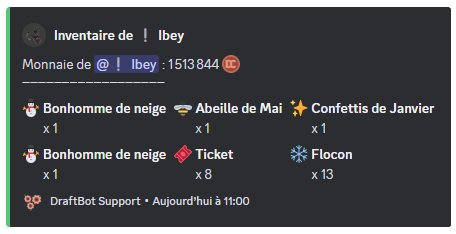
You can view another member's inventory by mentioning them or by using their username after the command. For example: /inventory member:@Username.
Trading an item
There are a few ways to trade an item with another member through the /item command, selecting the member you want to trade with:
| Command | Description |
|---|---|
| /item give | Gives an item to a member |
| /item sell | Sells an item to a member |
| /item exchange | Exchanges an item with a member |
The /dropitem and /item drop commands
The /dropitem and /item drop commands generate a message and grant the item to the first person who clicks the button ("Recover!" for /dropitem, "Claim!" for /item drop) within a set time between 1 and 10 minutes1.
What is the difference between the two, though?
- /dropitem ➜ Generates a new item to start the drop.
- /item drop ➜ Gives away an item taken from a member's inventory.
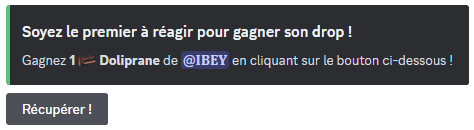
In both cases, you can choose the channel where the drop is started and how long it lasts.
Checking the server's inventory items
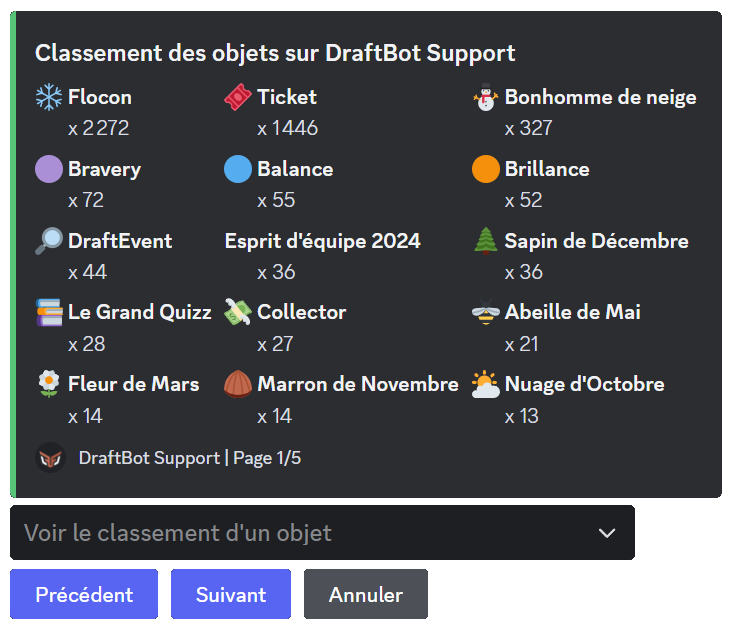
You can check the items existing on the server with the /topitems command. A selector at the bottom of the message lets you pick an item and see who owns it and in what quantity.
Footnotes
- By default the drop lasts one minute. ↩


