Once it is configured, remember to save your changes with the Save button at the bottom of the page.
Auto-moderation
Auto-moderation blocks bad behavior such as spam, advertising or insults, and sanctions it, all without any action on your part.
Infractions detection
Infractions are what triggers auto-moderation: sending a forbidden word, a forbidden link, etc. Sanctions are the moderation actions: warning the member, kicking them, banning them, etc.
Go to the 🛡️ Auto-moderation section.
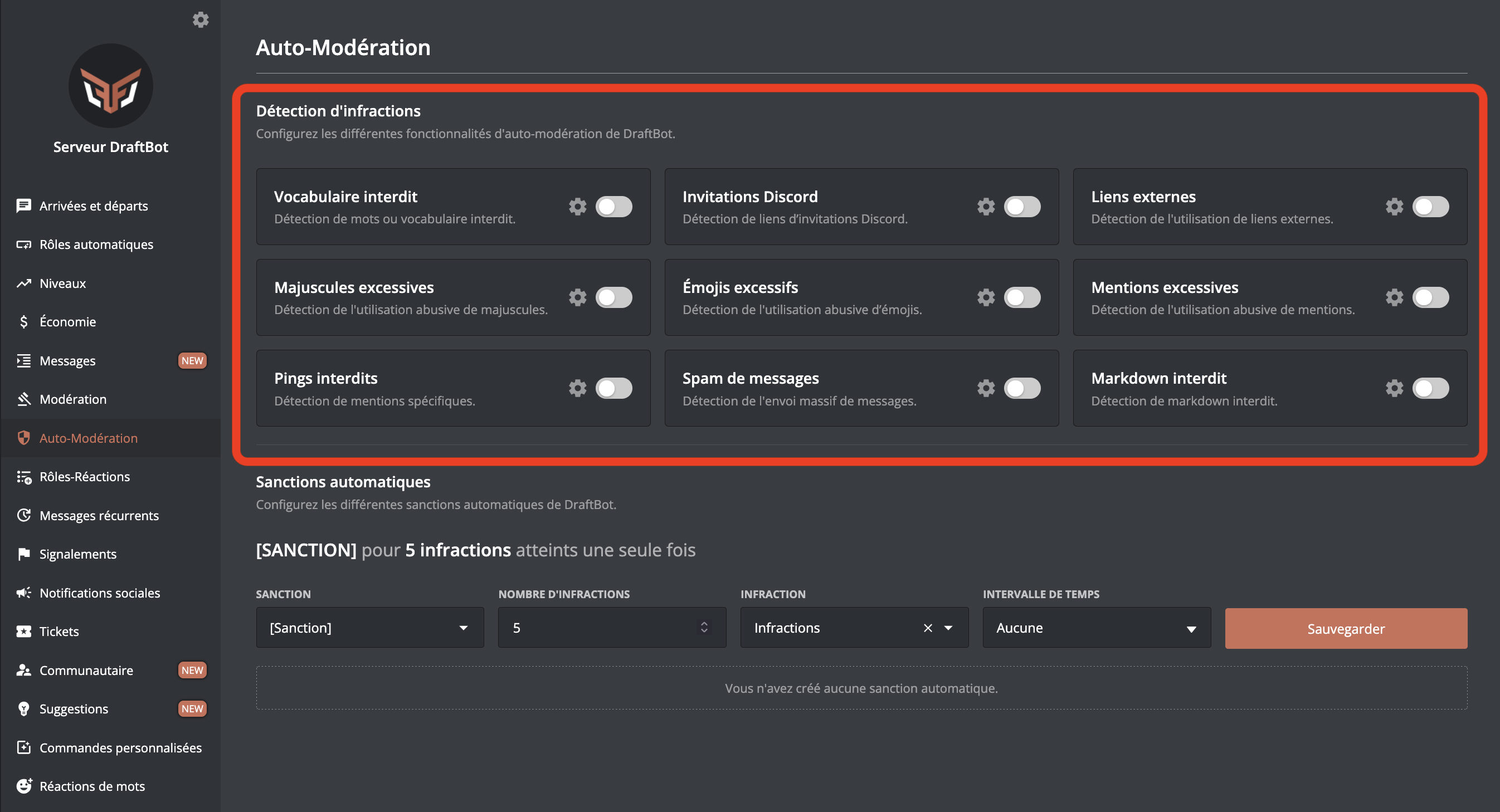
Click the  icon of a module to configure it, and enable it with the button to the right of the .
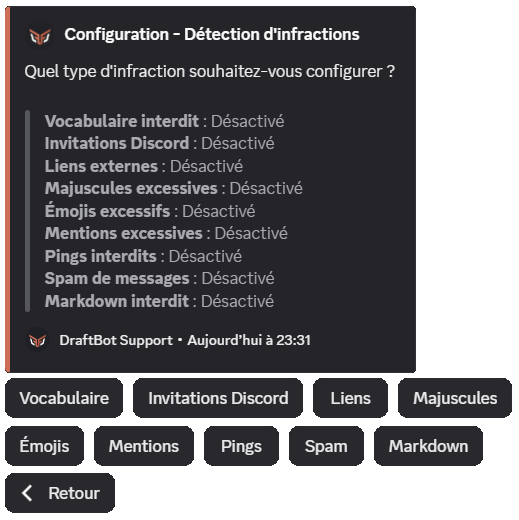
Every module includes these options, so they can be configured independently:
- Silent mode: if enabled, DraftBot does not reply to the infraction with an explanatory message.
- Ignored channels: channels where auto-moderation is disabled.
- Ignored roles: roles ignored by auto-moderation.
Administrators as well as the other bots on the server are automatically ignored by auto-moderation.
Forbidden vocabulary
You can choose expressions (words) that DraftBot blocks.
Adding a * at the beginning and/or the end of the word blocks words with a partial match: cat* detects cats, c a t, caaaaaat or c.a.t.
- The message blocking option blocks messages before they are sent, thanks to Discord's AutoMod system
 , while still counting the infraction in the member's history. As AutoMod also analyses voice channel statuses, an infraction detected there is flagged as such in its reason: "Detected in a voice channel status."
Only the first 1000 words are supported, because of a Discord limitation.
- If the censorship option is enabled, DraftBot resends the blocked message through a webhook with the user's name, their profile picture and the censored expression.
Discord invitations
This module forbids invitation links from being posted in your server's channels (invitations to your own server are not blocked).
- The allowed invitations option sets invitations that auto-moderation ignores.
- The immune servers option extends the previous one to every possible invitation of a particular server, by giving its ID.
This option is a feature reserved for premium  servers.
- If the censorship option is enabled, DraftBot resends the message through a webhook with the user's name, their profile picture and the censored invitation link.
Every invitation is analysed. Those leading to your server or to one of its voice channels are ignored automatically.
External links
This module forbids links from being posted on your server.
- The allowed/forbidden domain names option forbids or ignores only certain links by giving the domain name;
draftbot.fr, for example. - If the censorship option is enabled, DraftBot resends the message through a webhook with the user's name, their profile picture and the censored link.
Excessive uppercase
This module limits how much uppercase there is in messages.
- The percentage of uppercase is the maximum share of uppercase characters allowed in a message.
- The minimum number of characters is how many characters a message has to contain for auto-moderation to take it into account.
Excessive emojis
This module limits the use of emojis in messages.
- The percentage of emojis in the message is the minimum share of emojis a message has to contain for auto-moderation to take it into account.
- The minimum number of emojis is how many emojis a message has to contain for auto-moderation to take it into account.
Forbidden pings
This module forbids specific members or roles from being mentioned.
Select the mentions you want to forbid in the members or roles field.
- The message blocking option blocks messages containing the forbidden mention before they are sent, thanks to Discord's AutoMod system , while still counting the infraction in the member's history.
Excessive mentions
This module prevents mention spam.
- The time interval is the period during which the number of mentions sent by a member must not exceed the set limit.
- The mention limit is the maximum number of mentions a member can send during the set time interval.
A role mention counts as 3 user mentions.
- If the remove option is enabled, DraftBot deletes the messages containing the mention spam. Be careful, this causes ghost mentions.
A ghost mention, or ghost ping, is a mention notification with no way to see the mention.
- The message blocking option blocks messages before they are sent, thanks to Discord's AutoMod system , while still counting the infraction in the member's history.
Mentions are counted separately for each member.
If mention blocking through Discord is enabled, mentions are counted per message, independently of the system offered by DraftBot. What is more, mentions coming from replies are not counted.
Message spam
This module prevents message spam.
- The time interval is the period during which the number of messages sent by a member must not exceed the set limit.
- The message limit is the maximum number of messages allowed per member during the set time interval.
Messages are counted separately for each member.
Forbidden Markdown
This module blocks the use of the Markdown of your choice among:
- Code block
- Inline code
- Masked link
- Spoiler
- Header
- Subtext
- List
- Quote
If Return without Markdown is enabled, DraftBot resends the blocked message through a webhook, with the user's name and profile picture, with the Markdown removed (enabled by default).
You will find the details of the different Markdown types on this page.
Automatic sanctions
Automatic sanctions apply moderation actions to members automatically after a set number of infractions.
You can then configure the automatic sanctions.
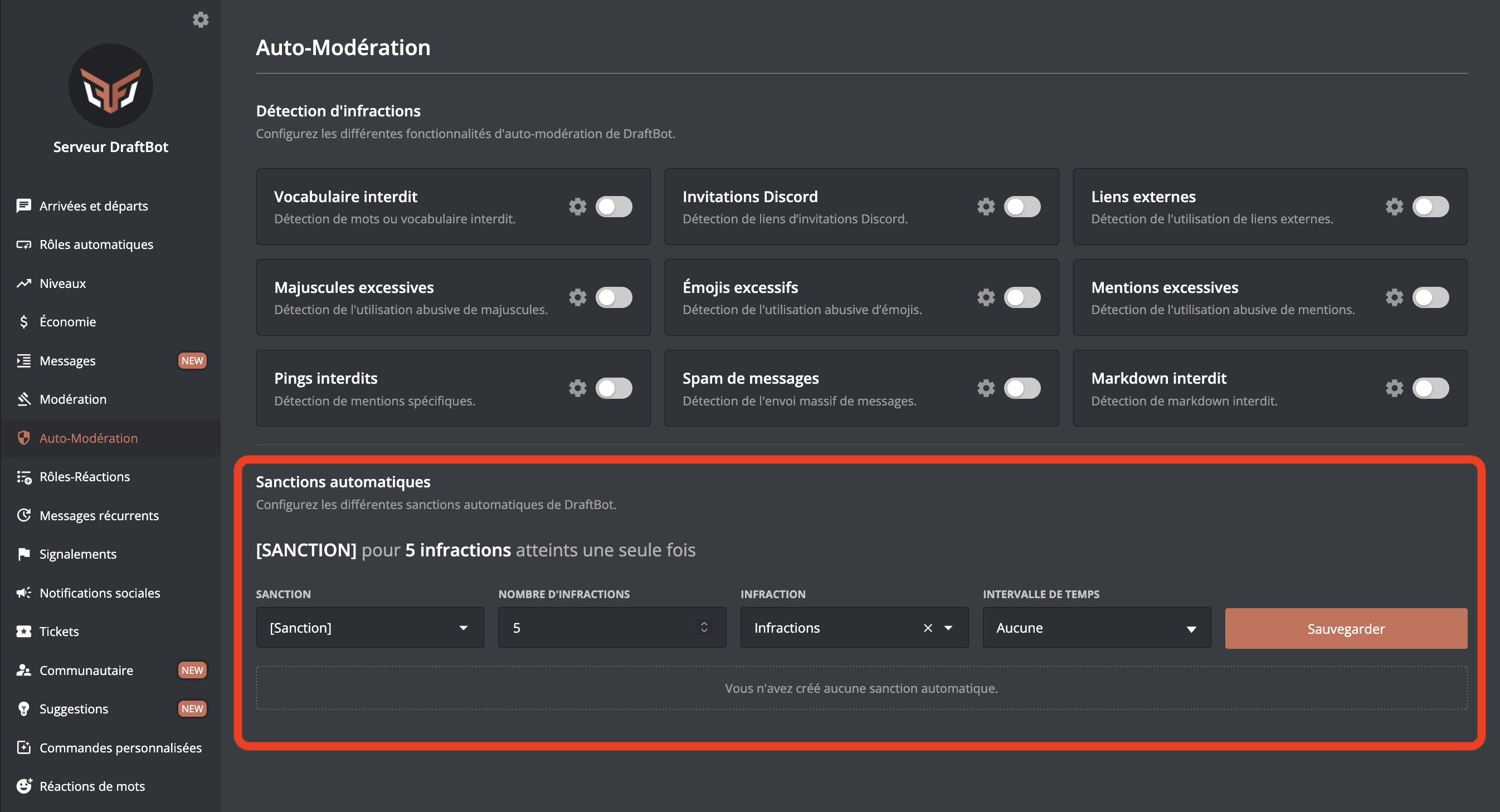
Once your changes are done, remember to save them with the Save button on the right of the page.
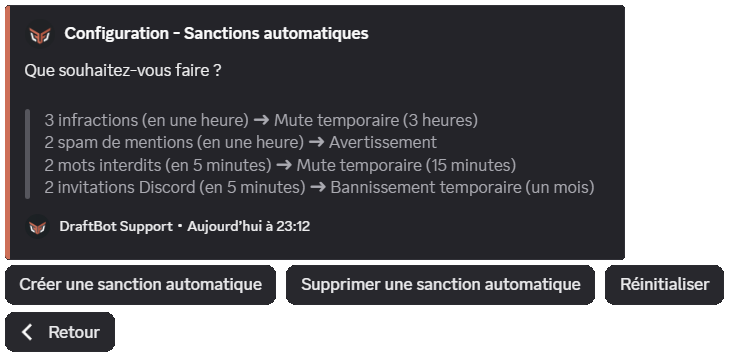
- Sanction: the type of sanction applied when the automatic sanction is triggered (a warn, for example).
- Number of infractions: once this number of infractions is reached, the automatic sanction is applied.
Infractions are counted separately for each member.
- Infraction: sets which type of infraction is counted for the automatic sanction.
- Time interval: the automatic sanction triggers if the number of infractions set above is reached during this time interval.
You can configure up to 10 automatic sanctions. Premium servers can have 50.
When you choose a ban (permanent or temporary) as the automatic sanction, you can also choose "Del. messages". This lets you decide whether to delete the user's messages over a certain period (last hour, last 6 hours, last 12 hours, last 24 hours, last 3 days or last 7 days).


