Game statistics
Do you know your game statistics? With these commands, you will!
Game profile
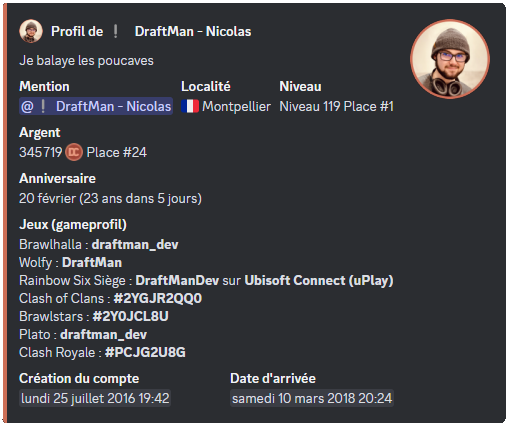
The /profile command displays your profile and the game usernames you have linked to it. To check someone else's, name them in the member option.
Linking your usernames to DraftBot
For your game usernames to appear on your profile, you first have to link them to it.
Here are the two ways of doing so.
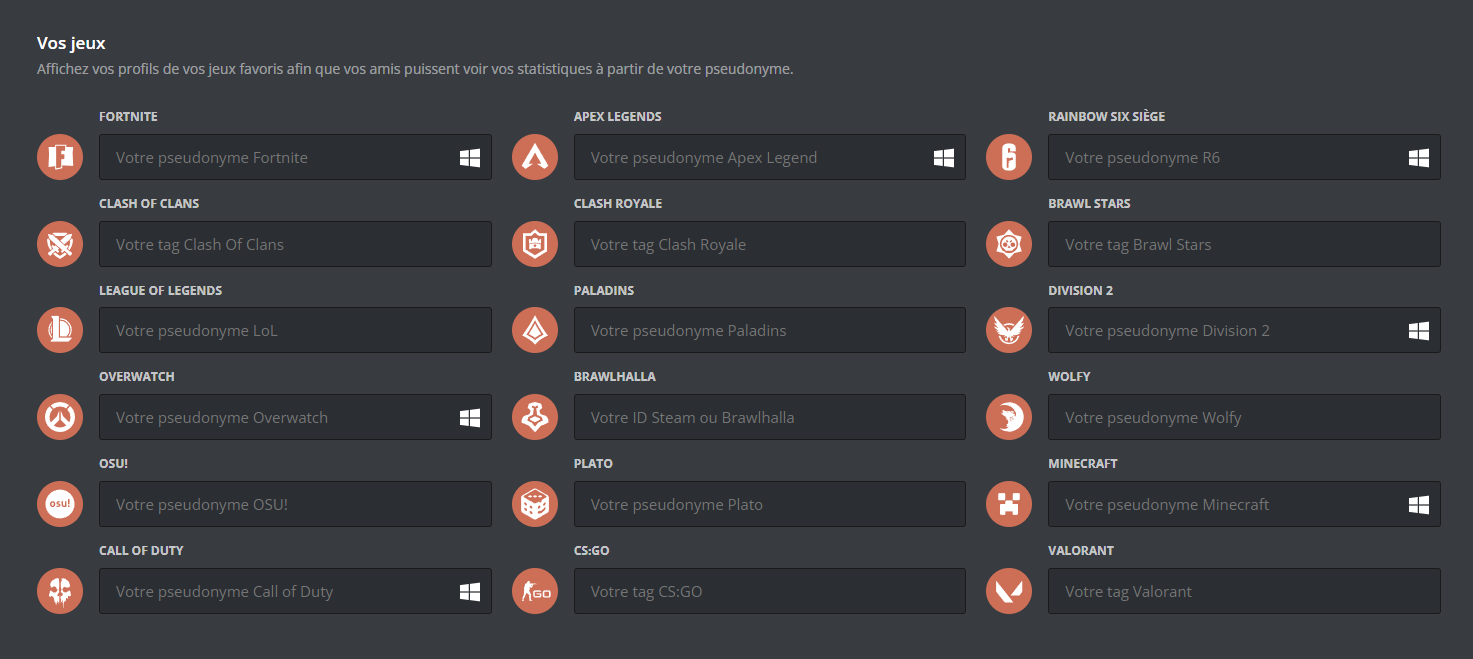
To link your game to your Discord profile, go to the configuration page of your profile.
Then scroll down and you will be able to link your different games.

The different types of identifier
Some games do not identify players by a username, but by a TAG or an identifier specific to the game:
- Clash of Clans:
TAG(e.g. #ABC123) - Clash Royale:
TAG(e.g. #J8UOYV92C) - Brawl Stars:
TAG(e.g. #GYCLLP0PU) - CS:GO:
TAG(e.g. #AHKMX-F8TA) - Brawlhalla:
ID(e.g. draftman_dev) - Valorant:
TAG(e.g. ls62#0069)
Game statistics
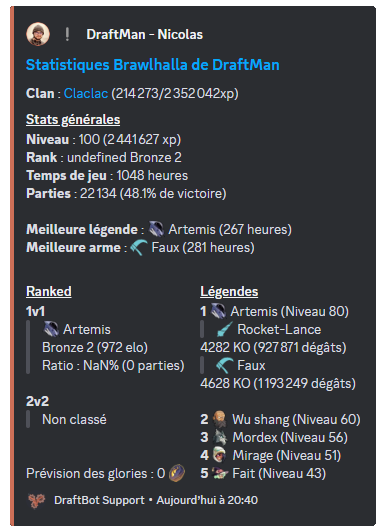
/stats brawlhalla
To get your Brawlhalla statistics, run the /stats brawlhalla command and enter the user's TAG or mention them.
- Clan: the name of the clan the player belongs to.
- Level: the player's overall level.
- Rank: the player's ranking in competitive modes.
- Playtime: the total time spent playing Brawlhalla.
- Your games: the total number of games played by the player.
- Best legend: the legend (character) the player performs best with, or uses most often.
- Best weapon: the weapon the player has had the most success with, or prefers to use.
/stats brawlstars
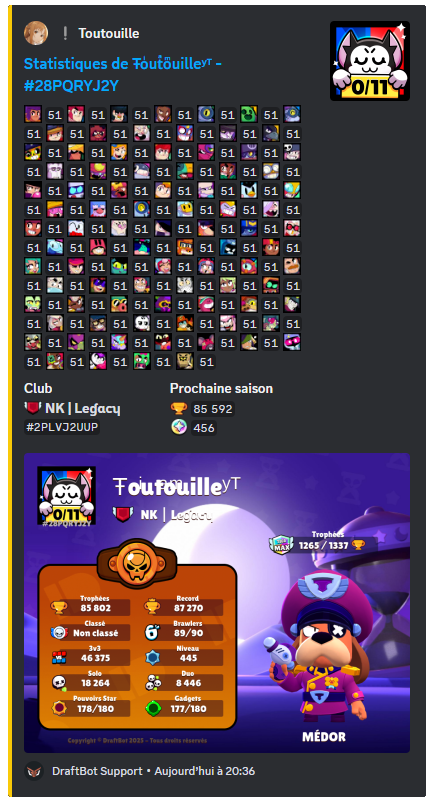
To get your Brawl Stars statistics, run the /stats brawlstars command and enter the user's TAG or mention them.
- All the brawlers: the full list of playable characters (brawlers) the player owns, with their levels, rarities and special abilities.
- Club: the name of the club the player belongs to.
- Number of trophies: the total trophies collected by the player.
- Number of blings: an in-game currency used to buy skins and other cosmetic items to customize brawlers.
/stats clashofclans
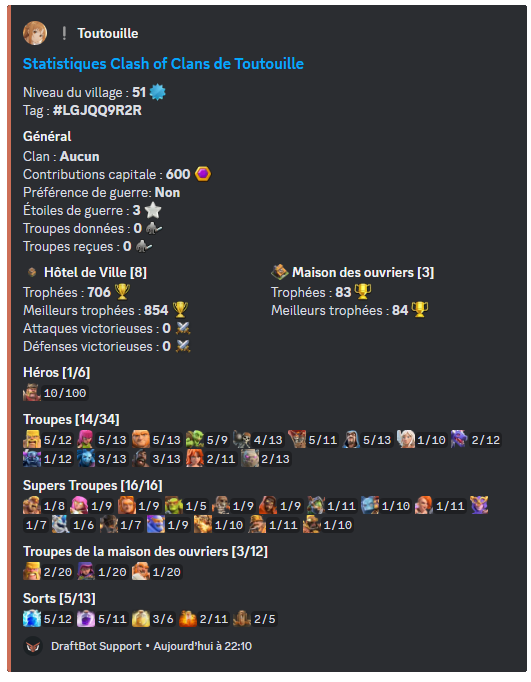
To get your Clash of Clans statistics, run the /stats clashofclans command and enter the user's TAG or mention them.
- Village level: the overall level of your village, which grows as you upgrade your buildings and troops.
- Player tag: the player's identifier.
- Clan: the name of the clan the player belongs to.
- Capital contributions: how many resources or how much effort the player has contributed to building or upgrading the clan capital.
- Clan war preferences: indicates whether the player takes part in clan wars.
- War stars: the total number of stars the player has earned in clan wars.
- Troops donated: the number of troops the player has given to their clan mates.
- Troops received: the number of troops the player has received from their clan mates.
- Town Hall: the player's current Town Hall level.
- Builder huts: the number of builder huts available.
- Heroes: the heroes.
- Troops: the different troops available for attack and defence.
- Super Troops: the upgraded versions of the normal troops.
- Builder base troops: the troops specific to the builder base.
- Spells: the different spells.
/stats clashroyale
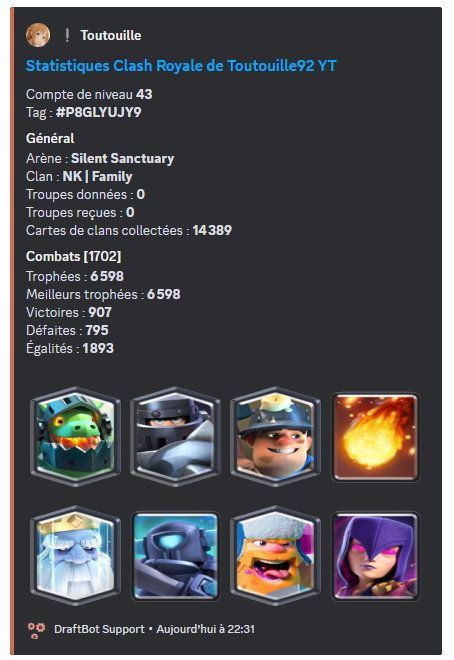
To get your Clash Royale statistics, run the /stats clashroyale command and enter the user's TAG or mention them.
- Level: your account's overall level.
- Tag: the player's tag.
- Arena: the area you fight in.
- Clan: the player's clan.
- Troops donated: the total number of cards you have given to your clan mates.
- Troops received: how many cards you have received from the members of your clan.
- Clan cards collected: the total cards earned during clan wars.
- Number of trophies: the number of trophies currently held.
- Best trophies: the player's trophy record.
- Number of wins: counts every one of your victories in battle.
- Losses: the number of matches lost.
- Draws: the number of matches ending without a winner.
/stats osu
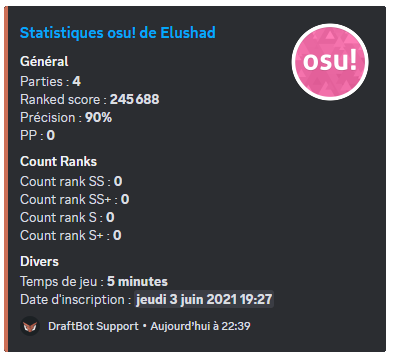
To get your osu! statistics, run the /stats osu command and enter the user's username or mention them.
- Number of games played: the total number of games you have played.
- Ranked score: the score accumulated in ranked maps only.
- Accuracy: a percentage calculated from how precise your hits are compared with the perfect timing of the notes.
- Performance points: your overall skill level.
- Rank counts: how many times you have reached each rank (SS, S, A, etc.) in your games.
- Total playtime: the total time you have spent playing.
- Registration date: the date you created your account.
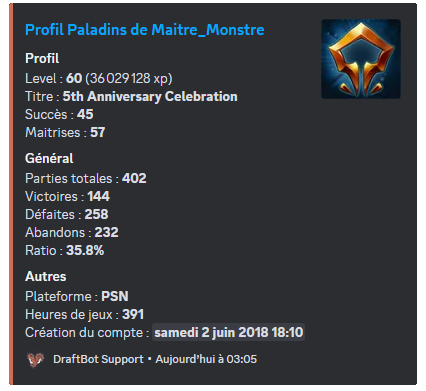
/stats paladins
To get your Paladins statistics, run the /stats paladins command and enter the user's username or mention them.
- Level: the experience level reached.
- Title: a rank or honorary distinction earned from in-game achievements or performance.
- Number of achievements: counts the total achievements unlocked.
- Number of masteries: how many skills or abilities the Paladin has fully mastered.
- Number of games: the total number of games played.
- Number of wins: the number of games won.
- Number of losses: the number of games lost.
- Number of leaves: counts how many times the player left a game before it ended.
- Ratio: usually calculated by dividing the number of wins by the number of losses, this ratio measures overall performance.
- Platform: the device or system used to play.
- Hours in game: the total time spent playing.
- Account creation: the date the account was created.
/stats wolfy
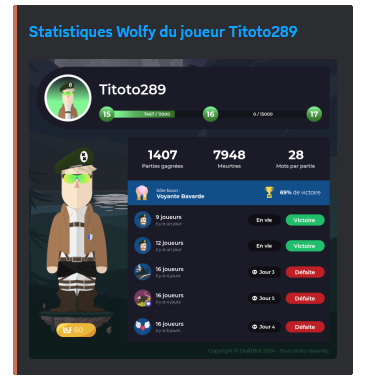
To get your Wolfy statistics, run the /stats wolfy command and enter the user's username or mention them.
- Level: reflects your progress and the experience you have accumulated.
- Number of games won: shows your strategic effectiveness and your victories.
- Kills: shows the total number of kills carried out.
- Average deaths per game: measures your ability to survive during games.
- Favourite role: highlights the role you prefer, or the one you get the best results with.
- Game history: gives a detailed overview of your past performance so you can track your progress.
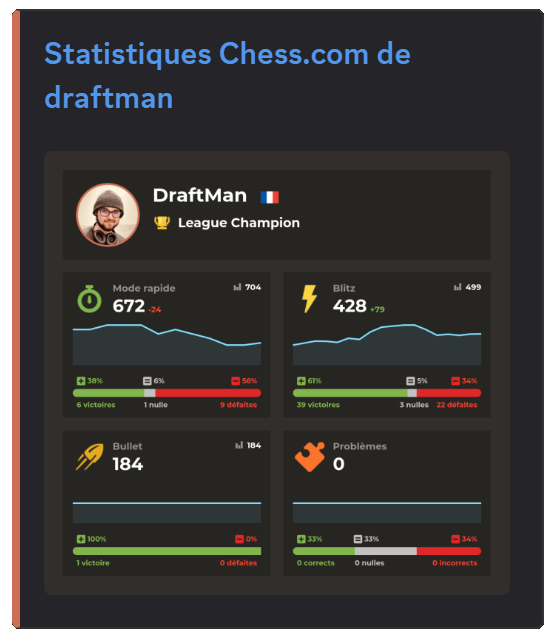
/stats chess
To get your Chess.com statistics, run the /stats chess command and enter the user's username or mention them.
- League: the user's current league.
- Rapid mode: the ELO rating in rapid games (10 - 30 minutes).
- Blitz: the ELO rating in Blitz games (3 - 5 minutes).
- Bullet: the ELO rating in Bullet games (1 minute).
- Puzzles: statistics about the puzzles solved by the member.