You can create up to 3 reminders at the same time. Premium  servers can have up to 10 at the same time.
Reminders
With DraftBot, this feature lets you create a reminder so you are reminded of something after a set time, by being mentioned.
Creating a reminder
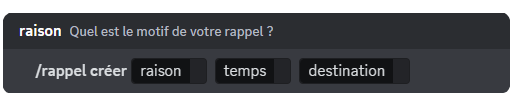
To create a reminder, run the /reminder create command. DraftBot then offers you these fields:
- The reason: so you know what your reminder is about.
- The time: how long from now you want to receive your reminder.
- The destination: where you want to receive it, between your direct messages and the channel the reminder was created in.
Note that reminders have to be 3 months or less.
 Congratulations, you have created a reminder! You will be mentioned on your server by DraftBot, or notified in your direct messages, when the time comes.
Editing a reminder
You can edit a reminder at any time, even one that is already running, with the /reminder edit command. All you have to do is select the reminder you want to edit and choose a new reason, a new delay and another destination.
Deleting a reminder
To delete a running reminder, run the /reminder delete command and select the reminder you want to remove from the list.
Seeing the list of reminders
You can see the list of reminders with the /reminder list command. You get a summary of every running reminder, sorted by their duration.


