Statistics channels refresh every 15 minutes. Premium  servers get a 10-minute refresh.
Statistics channels
Statistics channels display various pieces of information about your server (members, bots, roles, channels, etc.) in real time, directly in voice channels or categories.
What statistics channels look like
Voice channels
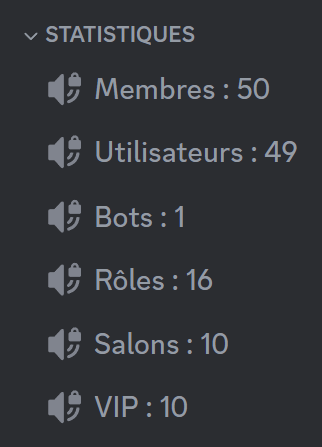
Category

Creating a statistics channel
Creating a channel
To create a statistics channel, click the "Create a channel" button. You can then choose a target.
Configuring the channels
When you decide to edit a statistics channel, a series of settings appears. You can Edit or Delete the channels of your choice.
Customizing the name format
Channel
You can change the name of a voice channel to whatever you want, as long as it comes before the " : ".
Category
You can change the name of a category to whatever you want, as long as it comes before the " – ".
Be careful not to touch the member counter, otherwise you will have to redo the configuration.
Custom API
This feature is reserved for premium servers.
The Custom API target displays a statistic coming from an external service, through an HTTP/HTTPS request to a web API.
To configure a custom API, you first have to give:
- The API's URL: for example
https://api.draftbot.fr/base/stats - The path to the numeric value: for example
guilds
This can be used, for example, to display:
- The number of users registered on a website
- Any other numeric value reachable through an API
A few important points to note:
- The API has to be reachable through an HTTP GET request.
- Credentials can be included directly in the URL, but custom headers are not supported at this time.
- Check that the response does contain a numeric value.
- A 10-minute delay applies between each refresh.
Format
The API has to return a JSON object containing a usable value.
Example of a valid response
{"count": 42}
In this example, DraftBot displays 42 in the statistics channel.
The value has to be a number; strings and complex objects are not supported.
A concrete example
If your API is reachable at:
https://api.draftbot.fr/base/stats
and returns:
{"guilds":1008140,"users":53253590}
The channel can display, for example:
👤 Servers: 1008140
